
Looking ahead at the gaming release calendar for the final few months of 2026, one thing is certain – it’s going to be almost impossible to maintain an active lifestyle and keep up with all the games I want to get through.
While the gamer stereotype might have us labelled as luddites that love nothing more than to sit on the sofa all day, I’m all for advocating that being a gamer doesn’t necessarily have to go hand in hand with being sedentary. As such, I’m always on the lookout for ways to maintain a healthy balance of movement while keeping up with my favourite hobby.
So, when FlexiSpot reached out and asked if I’d like to give its Motion X walking pad a go, I was keen to put it through its paces – literally. Over the past week, I’ve swapped sitting while gaming for walking, racking up tens of kilometres each day while I whittle my way through this month’s impressive slate of games.
FlexiSpot’s Motion X walking pad has proven equally impressive in that time, holding up as a well-put-together piece of kit that’s both durable and easy to use. I can see it becoming a staple of both my work and gaming setup, and a vital method of burning a few extra calories now these longer nights are drawing in.
The FlexiSpot Motion X arrives in a well packaged box with everything already pre-assembled. Whack the pad on the floor, plug it into the mains and throw some AAA batteries (which sadly aren’t included) into the remote, and you’re good to go.
There’s an allan key also included in the box for adjusting the belt as well as some lubrication for the belt. FlexiSpot provides a helpful pamphlet that explains how to look after your walking pad, as well as how often you should be servicing it.
On first impressions, the Motion X is well constructed and feels pretty weighty. It doesn’t move around at all when in use thanks to some well-placed rubber feet that keep it in place on both hard and soft floors.
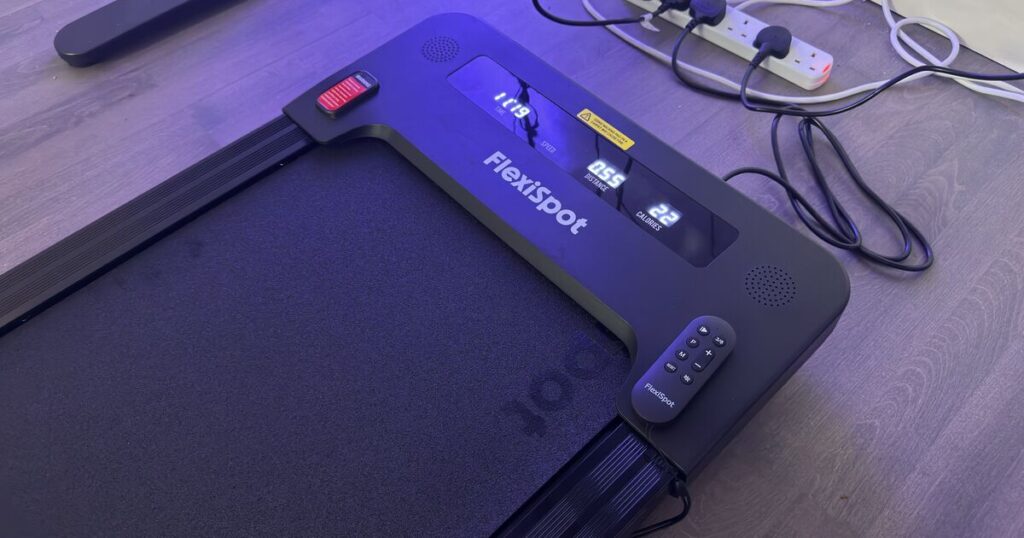
The all-black design looks sleek and would fit into pretty much any home office setup. The only real adornments are the FlexiSpot logo which appears twice in white, plus a few warning stickers.
A sticker appears over where the remote control magnetises, which is a small blemish on an otherwise simple design. Adding a sticker here feels a little cheap, although you can remove it if you can remember exactly where the magnet is.
Speaking of the remote, that’s exactly how you’ll operate the Motion X. It features buttons to start and stop the pad, increase its speed gradually, or select one of the several different training modes it comes pre-packaged with.

FlexiSpot Motion X walking pad. (Image: FlexiSpot)
I particularly appreciated the dedicated button that swaps between either 3 or 6km/h, as this means you can be up and running in just two button presses. I found the 3km/h setting to be ideal for most tasks, allowing me to still be able to write or play games while plodding along at a comfortable pace.
6km/h feels pretty speedy, forcing you to break out into a bit of a jog. Given this is meant to be used while working or playing, I didn’t find myself missing out on higher speeds since all-out running is not what this pad is designed for.
The only downside to the remote is that it’s the only way of controlling the Motion X pad. There are no physical controls on the unit itself, which I found to be a little frustrating if you either don’t have any AAA batteries lying around for the remote, or if you ever lose the thing later down the line.
That being said, the remote is an extremely handy way of controlling the pad, and I appreciated being able to start and stop with the remote on my desk versus having to step off the pad and bend down.
You can choose to use the Motion X in either a completely flat mode or at a slight incline with a 7º tilt. This is achieved via two feet that you manually deploy underneath the pad.
These can be a little tricky to do since the Motion X is quite heavy, but I found it to be a ‘set and forget’ feature, often opting to walk at an incline for the added workout to the posterior chain and additional calories burned.

FlexiSpot Motion X walking pad. (Image: FlexiSpot)
As for tracking, the Motion X has four LED data displays at the top of the pad. These show the current session length, current speed, distance walked and estimated calories burned.
I found these to be mostly accurate, although like most exercise equipment, I’d be wary of taking the calorie reading at face value. I recorded several activities on my Garmin smartwatch and received wildly different calorie reports from the heart rate data recorded on my wrist. In fact, I found the Motion X to actually undershoot by several calories compared to my Garmin.
This isn’t an issue isolated to FlexiSpot’s Motion X, but more so with any piece of exercise equipment that isn’t also directly tracking your biometrics. It’s great as a rough estimate, but shouldn’t be taken as gospel.
In terms of how the pad feels under feet, it’s extremely comfortable. I tried the pad using both my usual pair of walking trainers and just a pair of socks, and the belt felt soft underfoot while providing a firm surface to walk on.
The length of the pad is long enough that you don’t feel like you’re clipping the front with your toes or slipping off at the back. It’s also wide enough to accommodate a bit of meandering, which I am prone to.

FlexiSpot Motion X walking pad. (Image: FlexiSpot)
Any walking pad in this category is going to make noise, and the Motion X is no exception. The belt emits a low hum while it turns, and each step provides that usual whine that you’re used to with most treadmills.
If you’re working in a shared office with anyone else, it’s likely to get annoying fast. While I wasn’t able to measure the exact decibel volume of the device, I can anecdotally say that I had to knock the volume of my ambient music up a couple notches more than usual.
Whack a pair of headphones on though, which I tended to do during gaming sessions, and the noise of the Motion X melts away. It’s a worthwhile trade-off for the utility the walking pad provides.
One of my major concerns when receiving the Motion X was where I was going to store it, as I like to keep my desk setup as clean and tidy as possible.
Thankfully, FlexiSpot has thought of this too. There are small wheels at the top end of the walking pad’s base, which makes moving it around a breeze when picked up from the bottom end of the pad. I was able to quickly lean the pad against the wall next to me when not in use with it taking up next to no space.
In terms of working and playing while using the Motion X, it certainly takes a bit of getting used to. However, after giving it a few hours, I quickly managed to get used to tapping away at my keyboard while keeping my lower half in motion.
During my work days, I actually found that I was able to stay more focused on my work, locking into tasks with fewer distractions. The barrier of stopping the Motion X to step off and do something else around the house proved invaluable during busy times, like live reporting the two Nintendo Direct’s that happened this week.
I found it to be particularly immersive while playing games, too. There’s something about the feeling moving your own body while controlling a character on screen that makes you feel like you’re a part of the action.
I can’t speak for the FlexiSpot Motion X’s long-term health benefits, but I’ve certainly found it to have a positive impact on both my work and gaming lifestyle this week. I’m looking forward to its continued use throughout the winter months.
4/5
Unit provided by FlexiSpot for review purposes only.