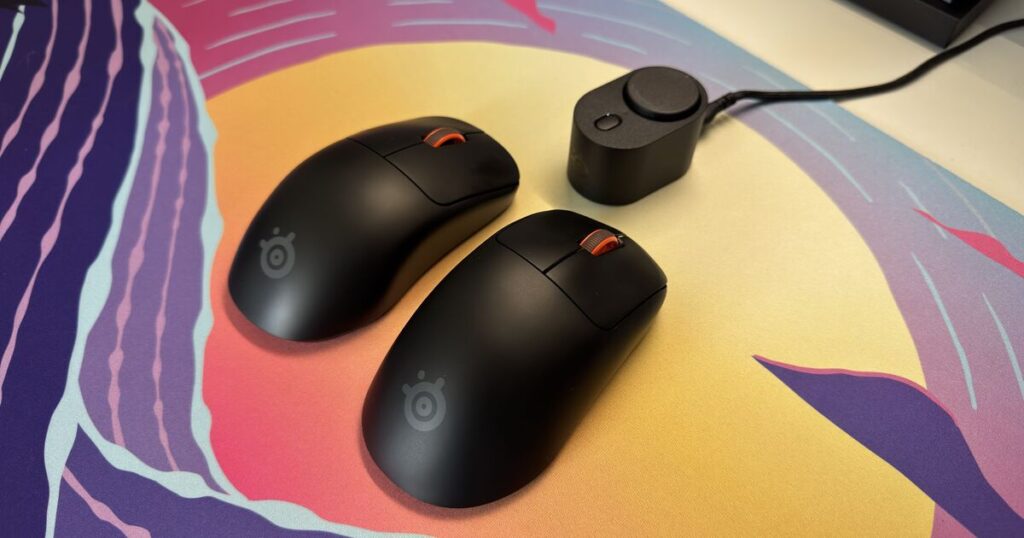


SteelSeries Rival Pro and Sensei Pro. (Image: Joshua Boyles)
Gaming mice are a particularly tricky category of gadget to review. You can throw all the state-of-the-art sensors and connection technology at a new product, but getting gamers to swap from the mouse shape their muscle memory fell in love with 15 years ago is a tough problem to overcome.
With this year’s iteration on the Sensei Pro and Rival Pro mouse designs, SteelSeries is giving gamers a very compelling reason to swap to their symmetrical and ergonomic designs with connection and battery technology that can’t be found on any other mouse out there. Throw in one of the lightest weights I’ve ever seen on a mouse without cutting holes in it, and SteelSeries seems to be on to a winner here.
Although the Rival and Sensei are technically two different SKUs, I’m reviewing both together as the technology inside them is essentially the same. The only major difference is the shape in the hand, with the Sensei featuring a perfectly symmetrical shape and the Rival opting for a slightly sloped, ergonomic feel in the hand.
Which one you prefer will purely come down to preference. Somehow, both managed to maintain an extremely slim weight profile, with both coming in at an impressive 53g.
As a hybrid grip player, I gravitated towards the Rival personally as I found the central hump to be more pronounced and pressed into my palm more comfortably. I felt I was able to maintain performance for much longer sessions using this mouse versus the Sensei, which I think would appeal more to claw grip players.
In terms of build, both mice feature well-balanced scroll wheels and two side buttons that feature a satisfying click. Underneath, two large non-slip pads keep the mice gliding perfectly across your mousemat, and feel durable enough to stand the test of time.
The only other feature of note here is a small LED light which lights up in multiple colours, which is crucial for figuring out which mode the Sensei and Rival Pro are set to. This is vital because the settings on these mice are what truly set them apart from the competition.

SteelSeries Rival Pro and Sensei Pro. (Image: Joshua Boyles)
While the likes of Logitech have offered 8K polling rates on their mice before, the technology has had its downsides. True 8K performance isn’t always consistent, with other signals prone to interfering with the connection between mouse and receiver.
SteelSeries’ answer to this is to bring the receiver much closer to the mouse itself with a new docking station, which connects to the mouse via a 6GHz connection. Very few other peripherals currently use this technology, leaving the lanes wide open for uninterrupted connection between these mice and your PC.
The other downside to using 8K polling is that it absolutely decimates battery life. When using this setting, even the Rival and Sensei are only rated to last around 16 hours at a time, which is barely enough for two full days of gaming if you’re really going ham.
This is where SteelSeries has leveraged some ideas from its Nova line of headsets, with the Sensei and Rival Pro using their own form of the infinite battery system. That receiver hub that sits on the desk? It also houses and recharges a small battery puck that can be hotswapped out when your mouse dies, essentially meaning you never run out of battery life.

SteelSeries Rival Pro and Sensei Pro. (Image: Joshua Boyles)
I’ve been a huge fan of this charging solution on the SteelSeries Nova headsets, and it’s utilised flawlessly here too. Swapping batteries takes a matter of seconds, and it means you’re able to take advantage of those more accurate polling rates without having to worry about charging.
Another neat feature SteelSeries has included on these mice is the ability to separate 8K polling between the clicks and the sensor. For example, some games can run into performance or compatibility issues when receiving an 8K polling input from the sensor, but the 8K polling click rate is much less taxing. It’s great to see this feature included here, as it’s something that – as far as I’m aware – no other mouse manufacturer on the market is offering.
All of this can be adjusted within the SteelSeries software, which is delightfully in-depth. It even comes with a built-in aim trainer and a tool for estimating your ideal sensitivity and DPI, as well as a settings matcher that makes swapping from another mouse brand easier than ever.

SteelSeries Rival Pro and Sensei Pro. (Image: Joshua Boyles)
So, how does all of this shape up when actually using the mouse for competitive games?
I won’t lie and tell you that as a very average Counter-Strike and Overwatch player I was able to notice the difference when swapping between the polling rates. However, it did give me great confidence to know that my missed shots were 100% down to my own abilities rather than any sort of hardware limitation.
The light weight is incredibly impressive, especially with the amount of tech packed inside these mice. They almost feel weightless in the hand, making fast flicks easier than ever before.
The hot-swappable battery system also came in clutch on numerous occasions. It’s a feature that once you start using on some of your peripherals, you seriously wonder why no other competitor has followed suit with a similar idea.
My only major gripe with these mice isn’t something that I actually encountered as an issue, but does give me cause for concern in the long-run. To keep weight down, SteelSeries has opted to remove the USB C connector altogether. Afterall, if it isn’t needed for charging or connectivity, then why not shave off a few more grams?
Thankfully, I didn’t run into any connectivity issues with either of these mice, but I have to wonder how any issues that may arise in the future would be diagnosed or solved without a physical connection between the mouse and a PC.

SteelSeries Rival Pro and Sensei Pro. (Image: Joshua Boyles)
The Verdict
The SteelSeries Rival Pro and Sensei Pro are two very impressive mice that are on the pinnacle of connection technology. If you want the absolute best, most accurate connection between your mouse and the game you’re playing, these are now the two mice to beat.